The first time I moved my Bitcoin off an exchange and onto a hardware wallet, my hands were actually shaking. Not because it was complicated, it wasn’t. Because I suddenly understood, for the first time, that I was holding something real. Not a number on a screen controlled by a company I’d never met. My Bitcoin. My keys. My responsibility.
The Ledger Nano X is the wallet I chose, and it’s the one I still use today. I’ve tested others since. I’ve read the reviews, watched the comparisons, sat through the arguments about Trezor versus Ledger on crypto forums at midnight. And after all of that, I keep coming back to the same answer: for a beginner who wants professional-grade security without a steep learning curve, the Nano X is still the one I’d recommend.
This is my honest, hands-on review — what it does, what it costs, where it falls short, and whether it’s worth buying right now, especially with the Ledger Independence promotion running until July 3rd.
Key Takeaways
- The Ledger Nano X is a hardware wallet — a physical device that stores your private keys offline, completely out of reach of hackers and exchange failures
- It supports over 5,500 cryptocurrencies, connects via Bluetooth to your phone, and manages everything through the free Ledger Live app
- Setup takes around 20 minutes and requires no technical knowledge — if you can set up a new phone, you can set up a Ledger
- The Ledger Independence promotion (ending July 3) lets you earn Bitcoin back on your purchase: $80 BTC on the Stax, $70 BTC on the Flex, $40 BTC on the Nano Gen 5
- Cold storage is not optional once your holdings reach an amount that would genuinely hurt to lose — this is the tool that makes it possible
New articles, straight to your inbox.
Whether you’re just curious or already investing, you belong here.
Join HereWhat Is the Ledger Nano X, Exactly?

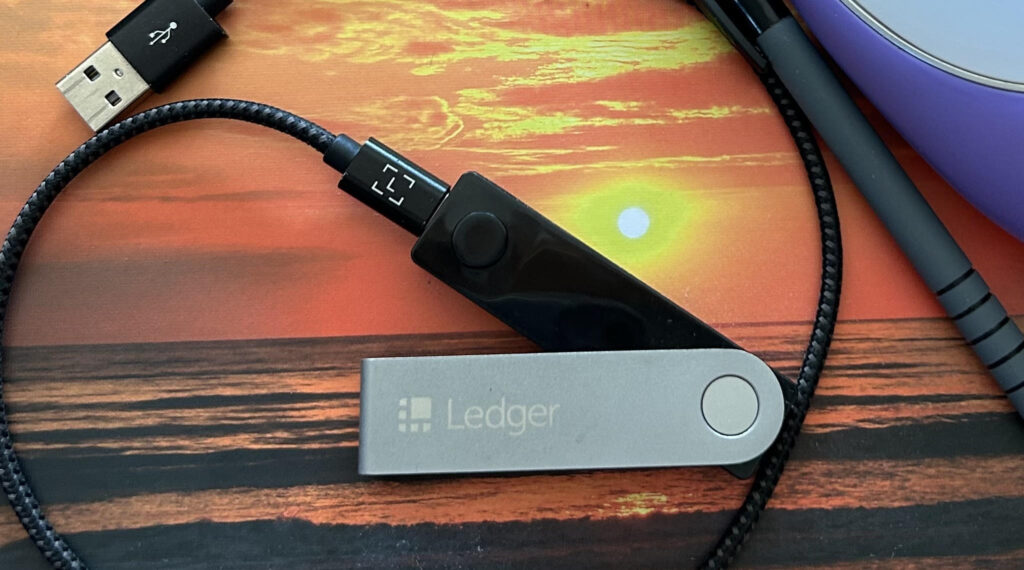
The Ledger Nano X is a hardware wallet — a small physical device, roughly the size of a USB drive, that generates and stores your private keys completely offline. Your private key is the cryptographic password that proves you own your crypto. When that key lives on an exchange or a software wallet connected to the internet, it’s always at some level of risk. When it lives on a Ledger, it never touches the internet at all. That’s the entire point, and it’s a genuinely powerful distinction.
Ledger was founded in Paris in 2014 and has shipped over seven million devices worldwide. The company operates at the serious end of the security hardware industry — their chips are the same kind used in passports and credit cards. When you press the button to confirm a transaction on a Ledger device, that confirmation has to happen physically, on the device itself. No amount of remote hacking can get around that requirement.
The Nano X specifically is Ledger’s mid-range device and their most popular model. It supports over 5,500 cryptocurrencies, connects to your phone via Bluetooth (so no laptop required), has a rechargeable battery, and manages everything through their free Ledger Live app. It’s the model I’d recommend to most beginners who want serious security without the extra complexity of their premium devices.
Why Cold Storage Matters More Than Most Beginners Realise
When you buy crypto on Binance or any other exchange, the exchange holds your private keys on your behalf. You own a claim to crypto — but you don’t actually hold it. If the exchange is hacked, goes bankrupt, or freezes withdrawals (as FTX did in 2022, locking billions of dollars of user funds overnight), you have no direct recourse.
Cold storage removes that dependency entirely. Once your crypto is moved to a hardware wallet, you are the only person in the world with access to those funds. No exchange failure, no platform hack, no regulatory freeze can touch them. It’s the difference between holding an IOU and holding the real thing.
I kept my Bitcoin on Binance for longer than I should have. Not because I didn’t understand the risk in theory — I did. But the act of moving it felt complicated and irreversible in a way that made me hesitate. If that sounds familiar: the setup is genuinely easier than it looks, and I’ll walk through it below.
This Is the Wallet I Use to Keep My Bitcoin Safe.
Get My Ledger Now →What’s in the Box and How Setup Actually Works
The Ledger Nano X comes with the device itself, a USB-C cable, a short getting-started guide, and three recovery phrase cards — those blank cards where you’ll write down your 24-word seed phrase. That seed phrase is the master backup for your entire wallet. Write it down by hand, store it somewhere physically secure (not a photo on your phone, not a cloud document), and never share it with anyone. That’s the single most important instruction in this entire review.
Setup takes around 20 minutes. You download the Ledger Live app on your phone or computer, connect the device, and follow the prompts. The Nano X will generate your 24-word seed phrase — write every word in the exact order shown, double-check it, then verify it back on the device. After that, you install the app for whichever cryptocurrency you want to hold (Bitcoin, Ethereum, etc.), generate a receiving address, and you’re ready to receive funds.
The device itself has two physical buttons on the top. You use them to navigate menus and confirm transactions. It sounds basic, but the simplicity is intentional — every action requires deliberate physical input, which is exactly what makes it secure. An address confirmation that shows one thing on your computer and a different thing on the Ledger screen is a red flag for a man-in-the-middle attack. Always verify on the device.



The Ledger Nano X vs the Rest of the Ledger Range
Ledger currently sells several models, and with the Independence promotion running until July 3rd it’s worth understanding the differences:
The Nano Gen 5 is the entry-level model — smaller screen, no Bluetooth, USB connection only, and $40 worth of Bitcoin back with the current promotion. It’s a solid choice if you’re just getting started and want to try cold storage without committing to a premium device.
The Nano X (the one this review covers) sits in the middle — Bluetooth connectivity, a larger screen, longer battery life, and the ability to manage up to 100 apps simultaneously. It’s the model I use and the one I’d suggest for most readers.
The Flex and Stax are Ledger’s newer premium devices with touchscreens, significantly improved displays, and more polished build quality. The Stax earns you $80 BTC and the Flex earns $70 BTC under the current promotion. If you’re planning to hold a meaningful amount of crypto long-term and want the best experience, either of those is worth the extra cost. But for a first hardware wallet, the Nano X still does everything you need.
What I Actually Like About It (After Using It for a While)

The Bluetooth connection was the feature I was most sceptical about before I bought it. Bluetooth on a security device felt like a contradiction. In practice, it’s implemented in a way that doesn’t compromise the key storage — the private keys never leave the device, Bluetooth or not — and being able to manage my Bitcoin from my phone without hunting for a laptop cable is genuinely convenient for everyday use.
Ledger Live has improved a lot over the past two years. You can buy crypto directly through the app (with a slight premium), swap between currencies, stake some assets, and track your portfolio — all without exposing your keys. It’s become a proper financial management interface rather than just a transfer tool.
The device is also built well. It feels solid, the buttons are responsive, and the screen is clear enough to verify addresses properly. I’ve had mine for over a year, carried it on three international moves, and it still works exactly as it did on day one.
What Could Be Better
Ledger had a data breach in 2020 that exposed customer names, email addresses, and phone numbers. The keys and funds of users were not compromised — the security hardware did exactly what it was supposed to do — but the personal data leak was significant and the company’s handling of it was slow. They’ve improved their data practices since, but it’s worth knowing the history.
The seed phrase system, while industry-standard, puts a lot of responsibility on the user. If you lose your 24-word phrase and your device breaks, your funds are gone. There is no Ledger support team that can recover them. That’s the whole point of decentralisation, but it requires a level of personal organisation that some beginners underestimate.
Ledger also offers a paid “Recover” service that creates an encrypted backup of your seed phrase through third-party providers. It’s optional, and whether you use it depends on how much you trust centralised backup systems. I don’t use it personally, but I understand why some people would.
Not Sure Where to Start? Grab My Free Crypto Starter Guide.
Get the Guide Now →The Ledger Independence Promotion (Ends July 3)

Ledger is currently running their Independence promotion, which lets you earn Bitcoin back on any device purchase. Here’s the breakdown:
Ledger Stax: $80 worth of Bitcoin back Ledger Flex: $70 worth of Bitcoin back Ledger Nano Gen 5: $40 worth of Bitcoin back
The promotion ends July 3, which is in two days. If you’ve been thinking about getting a hardware wallet, this is a genuinely good moment to do it — you’re essentially getting a portion of your purchase returned in Bitcoin, which compounds if the price moves in your favour.
To claim the Bitcoin back, follow the instructions in your purchase confirmation email after buying through the official Ledger store. The process takes a few weeks to complete.
My Verdict
The Ledger Nano X is not flashy. It doesn’t promise to make you rich or give you early access to some exclusive trading advantage. What it does is give you actual ownership of your crypto — which turns out to be the most important thing you can have in this space.
If you’re holding Bitcoin or any other cryptocurrency on an exchange right now, moving it to cold storage is the single most impactful security decision you can make. The Nano X makes that process as straightforward as it’s ever going to get. Setup takes less than half an hour. The app is clean. The device is reliable. And knowing your keys are offline, on a piece of hardware in your hands rather than on someone else’s server, is a different kind of feeling entirely.
I bought mine because I got tired of trusting other people with something I’d worked hard to own. I haven’t regretted it once.
This Is the Wallet I Use to Keep My Bitcoin Safe.
Get My Ledger Now →Frequently Asked Questions
Is the Ledger Nano X worth buying in 2026?
Yes, for anyone holding Bitcoin or other cryptocurrencies long-term. The Nano X gives you genuine ownership of your keys, protects against exchange failures and hacks, and has a simple enough interface that most beginners can set it up in under 30 minutes.
What happens if I lose my Ledger Nano X?
As long as you have your 24-word seed phrase stored safely, you can recover your entire wallet onto a new device. If you lose both the device and the seed phrase, your funds cannot be recovered by anyone, including Ledger. Keeping your seed phrase secure is the single most important step in the whole setup.
Is Ledger better than Trezor?
Both are reputable hardware wallets with strong security track records. Ledger uses a secure element chip (the same technology used in passports) and supports more coins. Trezor is fully open-source, which some security-focused users prefer. For most beginners, Ledger’s app ecosystem and Bluetooth convenience make it the easier starting point.
Can I use a Ledger Nano X with Binance?
Yes. Once your Ledger is set up, you withdraw crypto from Binance directly to your Ledger receiving address. The process takes about five minutes and is exactly the kind of move that turns exchange-held crypto into genuinely yours.
What is the Ledger Independence promotion?
It’s a limited-time offer running until July 3, 2026, where Ledger gives you Bitcoin back on any device purchase: $80 BTC on the Stax, $70 BTC on the Flex, and $40 BTC on the Nano Gen 5. Purchase through the official Ledger store and follow the redemption instructions in your confirmation email.
Do I need a hardware wallet if I only hold a small amount of crypto?
Not necessarily right away. If you’re just getting started with a small amount you’re actively learning with, an exchange like Binance is a reasonable place to begin. Once your holdings reach an amount that would genuinely hurt to lose, cold storage becomes worth the small upfront investment.
Sources:
Ledger Official Site — ledger.com Ledger Live App — ledger.com/ledger-live Investopedia — Hardware Wallet Overview — investopedia.com CoinDesk — Exchange Security and Hack Coverage — coindesk.com Ledger 2020 Data Breach — Official Communication — ledger.com

Written by Yana Ballantyne
Founder of Yadala · Crypto Educator · Swiss Real Estate Advisor
Yana is a German-born, Australia-raised investor with two decades of experience across property, shares and crypto. She founded Yadala to make crypto simple and accessible for women — without the jargon or the overwhelm. She recommends platforms she believes in but will never tell you which coin to buy. That decision is always yours.

Disclaimer & Affiliate Disclosure
This article contains affiliate links. If you purchase through these links, I may earn a small commission at no extra cost to you. I only recommend products and services I personally use and genuinely believe in. Your support helps me keep Yadala running and free to read — thank you.
The content on Yadala is for informational and educational purposes only. Nothing here constitutes financial, investment, or legal advice. I am not a licensed financial advisor. All opinions expressed are my own personal views based on my own research at the time of writing.
Cryptocurrency and Bitcoin investments are highly volatile and speculative. The value of digital assets can rise and fall dramatically, and you could lose your entire investment. Regulatory changes may also significantly impact the value or legality of cryptocurrency in your country. Never invest more than you can afford to lose completely.
Yadala and its author accept no liability for any financial loss or damage arising from decisions made based on information in this article. Always conduct your own research and consult a qualified financial advisor before making any investment decisions.